
Introduction
Hey, I’m Mhd Zain. For the past five years, I’ve lived at the intersection of AI and smart web strategy—testing tools, tweaking sites, and figuring out what actually helps you make money online. I’ve seen what gets sites approved for AdSense—and what gets them rejected. In this guide, we’ll unpack the top google AdSense rejection reasons in 2025 and the simple fixes that turn a “no” into a “yes.”
Reasons for getting Google AdSense rejection can break your dream to make money from your website. It’s not a good feeling to be rejected by AdSense, especially if you’ve spent hours of time working on content.
Many website owners are refused without being told why. The good news? The majority of AdSense denial reasons that Google could have sent you are actually fixable.
In 2025, Google is getting pretty selective about which sites are approved. They are seeking top-quality sites that deliver real value to users. And what this means is you have to know what Google is actually seeking.
This guide reveals the top rejection reasons and how to avoid them. By the time you finish, you will know how to get your site ready for AdSense approval.
Common Content-Related Rejection Issues
Poor Quality Content Problems
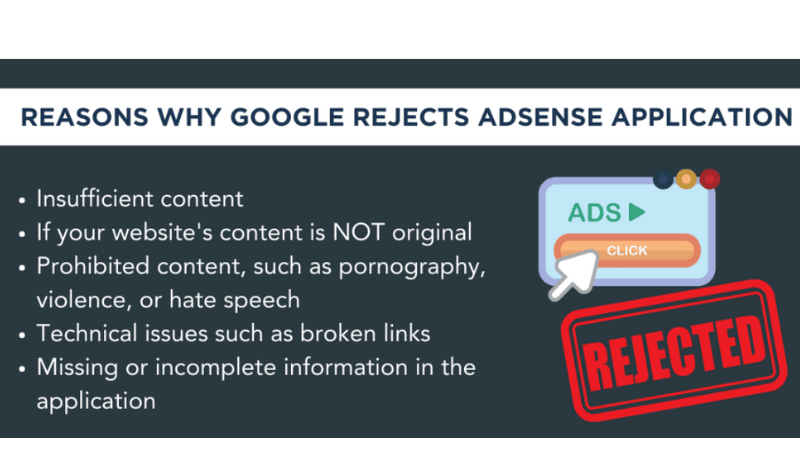
Poor content is the number one reason for Google AdSense rejection. Google values websites that help solve problems or teach something new.
Here’s what makes content low-quality:
- Articles under 300 words
- Copied text from other websites
- Grammar and spelling mistakes everywhere
- No clear purpose or message
Your content should be unique and useful. Write like you are speaking to a friend in need of some advice. Keep sentences short and readable.
Google’s bots can identify copied content in a fraction of a second. You can even be rejected for paraphrasing work from other papers. Write from your own experience and knowledge first.
Insufficient Content Volume
Too few pages is bad for AdSense application. Google wants to be sure you’re committed to your site.
At least 15-20 high quality pages are a common number among those who get in. Each and every page should contain more than 500 words of original copy.
Don’t rush to produce content for the sake of trends. Quality should take precedence over quantity. It’s better to have 15 great articles than 50 bad ones.
Write about what you know. This makes writing simpler and more natural.
Problems with the Website Design and User Experience
Navigation and Mobile Issues
Bad website navigation is confusing to both your visitors and Google’s crawlers. Your website should have well-defined menus and a logical structure to its pages.
Mobile-friendly design isn’t optional anymore. More than 60% of traffic on the web now comes from mobile devices. Google sees how your site looks on phones and tablets.
Common navigation problems include:
- Broken links that lead nowhere
- Non-mobile-friendly menus
- Pages load really slow
- No clear way to contact you
Test your site on different devices before you apply. Have friends look over your site and ask questions about confusing aspects.
Loading Speed Problems
Slow sites are annoying to users and have very low chances to get AdSense aprual. Google desires fast sites, or sites that give a good user experience.
Your pages should display in less than 3 seconds. Anything slower and visitors leave in a flash.
Common speed killers include:
- Huge image files
- Too many plugins
- Cheap web hosting
- Unoptimized code
Check how fast your site is using Google PageSpeed Insights. Compress your images and consider great hosting to make sure you’re fast enough.
Policy Violations That Guarantee Rejection
Adult and Inappropriate Content
Here is the fastest reason for Google AdSense rejection: ADULT CONTENT. That includes clear-cut pornography but also borderline material.
Google defines adult content broadly:
- Sexual or suggestive images
- Dating site promotions
- Adult product advertisements
- Gambling content
- Violence or gore
Even the presence of adult product ads on your site can lead to rejection. Keep your content family-friendly to be safe.
Copyright Infringement Issues
Publishing someone else’s content without permission is against copyright law. This includes pictures, videos, text, and music.
Most website owners are not aware that “free” images discovered through Google’s search function actually are not free to use. Most have copyright protection.
Safe content sources include:
- Your own photos and videos
- Creative Commons licensed content
- Paid stock photo sites
- Content you create yourself
Remember to verify image licenses to ensure they are available for use. When in doubt, create it yourself.
Technical Requirements and Standards
Missing Essential Pages
Google demands certain pages on each AdSense site. Failure to include these pages can almost guarantee rejection.
Required pages include:
| Page Type | Content |
| Privacy Policy | Information privacy, legal protection, data collection, data usage, cookies |
| Terms of Service | Conditions of use, user actions, rules, liabilities |
| Contact Page | Communication, email, phone, contact form |
| About Page | Site concept, your mission or purpose for the site |
Do not duplicate these pages from other websites. Write them for your site in particular. Generic templates look unprofessional.
SSL Certificate Problems
Websites that don’t have SSL certificates (HTTPS) are automatically rejected. SSL secures user data and makes Google know you are serious about security.
SSL certificates are free at most web hosts. If your site is still running on HTTP, then you should speak to your hosting company about that.
You’ll know if your website has SSL by taking a look at the URL. It should be “https://” not “http://”.
Traffic and Engagement Red Flags
Fake Traffic Generation
Purchasing fake traffic, or using bots to inflate visitor numbers, backfires horribly. Google’s system quickly catches false traffic patterns.
Signs of fake traffic include:
- Sudden surge in traffic from unusual countries
- Very short visit times
- High bounce rates
- Traffic from suspicious sources
Focus on gaining genuine visitors through:
- Search engine optimization
- Social media marketing
- Guest posting on other sites
- Email newsletters
True traffic takes time to develop, but it’s worth the wait.
Low User Engagement Metrics
Google sees how visitors interact with your site. Poor engagement signals indicate low-quality content.
Important engagement metrics:
- Time spent on pages
- Pages viewed per visit
- Return visitor percentage
- Social shares and comments
Improve engagement by:
- Writing compelling headlines
- Adding images and videos
- Asking questions in your content
- Responding to comments quickly
Geographic and Language Restrictions
Unsupported Countries and Regions
Not everyone can use AdSense. For applicants from unsupported countries, the application is automatically rejected.
Currently, you will find most of North America, Europe, Asia-Pacific, some parts of South America and Africa supported. Before applying, consult Google’s official list.
If you reside in a country that is not supported, try these:
Language Requirements
Your website’s default language must be your country’s official language. Using multiple languages on the same page complicates the review process for Google.
Maintain one language as the main one on your site. If you need multiple languages, create different sections or subdomains for each language.
Age and Account Restrictions
Minimum Age Requirements
You need to be 18 or older in order to have an AdSense account. There are no exceptions to this rule anywhere in the world.
If you are under 18, have a parent or guardian create the account for you, And Make sure they understand the responsibilities involved.
Multiple Account Issues
You’re only allowed to have one AdSense account per person or business. It’s against their terms of service to have multiple accounts.
You can add all your sites to one AdSense account if you have multiple sites. This is actually better, since it pools your earnings.
Users who were previously banned cannot create new accounts. Google tracks this information in a variety of ways, including IP addresses and payment information.
Simple Steps to Fix Common Rejection Issues
Content Improvement Strategies
Audit your existing content portfolio and begin identifying what needs improvement. Find pages that are thin on content, have poor grammar, or lack a clear purpose.
Manually take existing articles and rewrite them to be more informative and detailed. Include anecdotes and real-life examples. Split up big blocks of text into smaller, easier-to-read passages.
Put together a content schedule to publish articles regularly. Consistency demonstrates to Google that you’re serious about keeping your site current.
Technical Fixes and Updates
Address technical issues systematically:
- Install SSL certificate if missing
- Create required pages (Privacy Policy, Terms, Contact, About)
- Fix broken links and 404 errors
- Compress images and speed up page loading
- Test mobile responsiveness
Use Google Search Console to identify and correct technical issues. This is a free tool that tells you exactly how Google views your website.
Building Quality Traffic
Focus on attracting visitors who’ll want to read what you have to say. It’s not about how many visitors you have, it’s about how engaged those visitors are.
Effective traffic building methods:
- Write detailed how-to guides
- Answer questions people ask online
- Share good content on social media
- Create email lists for your most popular newsletters
- Network with other website owners
Prevention Tips for Future Applications
Pre-Application Checklist
Here are a few things to consider before you apply for AdSense:
Content Requirements:
- Minimum of 20 good pages
- Original, helpful content
- No spelling or grammar issues
- Clear site niche and purpose
Technical Requirements:
- SSL certificate installed
- All necessary pages created
- Mobile-friendly design
- Fast loading speed
- Working navigation menu
Traffic Requirements:
- Consistent organic traffic
- Good engagement metrics
- Traffic coming from different sources
- Real visitors, not bots
Ongoing Site Maintenance
Getting approved is only the first step. Maintaining AdSense requires ongoing effort.
Constantly update your website with fresh articles. Google cares a lot about active sites vs. those left to collect dust.
Track how well your site is performing with Google Analytics. Keep track of what articles do best and then write more like them.
Stay current with any AdSense policy updates. Google makes changes to their guidelines periodically, and you’ll want to make sure all new rules are being satisfied.
Alternative Monetization Options
Other Ad Networks
If AdSense declines your application, all is not lost for potential advertising revenue. Several alternatives exist:
- Media.net: Yahoo and Bing’s answer to AdSense
- Ezoic: An ad testing platform that uses AI to optimize your ads for more revenue
- PropellerAds: Great for monetizing traffic from around the world
- Infolinks: A great way to add in-text ads for monetization, without taking up valuable ad space
Direct Monetization Methods
Consider non-advertising revenue streams:
- Affiliate marketing with relevant products
- Selling your own digital products
- Offering consulting or coaching services
- Creating premium membership content
- Sponsored post opportunities
These methods frequently pay more than display advertising, particularly for smaller websites.
Frequently Asked Questions
How long does AdSense review take in 2025?
AdSense reviews in 2025 usually take 1-14 days. Complicated cases or policy breaches can lead to delays. Patience is essential as Google will not specify how long this may take.
Can we reapply after AdSense rejection?
Yes, you can reapply once you correct the mistakes that caused your rejection. Wait at least 30 days before reapplying so you have time to make improvements.
What is the minimum traffic for AdSense?
Google does not state minimum traffic requirements, but most successful applicants receive at least 1,000 monthly visits with decent engagement metrics.
How many pages do I need for approval?
Though Google never reveals the specifics, most approved sites have 20+ pages of high-quality, unique content with a minimum of 500 words each.
Can I use AdSense alongside other ad networks?
Yes, but review AdSense policies on ad placement and density. Too many ads can ruin the user experience and get your site in trouble with policy violations.
What if my previously approved site is later rejected?
AdSense may ban accounts after approval if they breach the rules. Always follow the guidelines and monitor your content regularly.
Conclusion
When you know why Google AdSense is rejecting applications, you can avoid the common pitfalls. Most reasons for denial include factors that can be corrected, such as low-quality content, missing pages, and policy infringement.
Focus on creating content that is helpful, original, and serves your audience. Create a website that is professional, easy to navigate, and loads quickly. Adhere closely to Google’s guidelines and avoid questionable material.
Always keep in mind that the road to AdSense approval is a journey that takes time and effort. You can’t rush the process by pursuing shortcuts that ultimately just lead to rejection. Spend time making a good website and make sure it comes off as professional.
And if you do get rejected, don’t lose hope. Fix the issues, improve your site, and try again. Many successful AdSense publishers initially faced rejection but learned from the experience.
Start making these changes today, and you can be earning from AdSense soon.
Check Out This Guide:– How You Can Easily Build a Website for Google AdSense Approval



Hey there.
cybersourceinfo.com, It’s clear you put real effort into your post —thank you.